network framework
Here are some tips for equipping your Web application with Detection Tools.
Integrations
If you are using one of the following libraries, check the integration documentation:
Otherwise, check whether your server uses WSGI or ASGI and check the corresponding integrations.
Capture HTTP Server Request and Response headers
Some methods, such as logfire.instrument_fastapi(), allow you to pass capture_headers=True to record all request and response headers in the span, which is usually all you need.
If you want more control, there are three environment variables that tell OpenTelemetry to detect library capture request and response headers:
OTEL_INSTRUMENTATION_HTTP_CAPTURE_HEADERS_SERVER_REQUESTOTEL_INSTRUMENTATION_HTTP_CAPTURE_HEADERS_SERVER_RESPONSEOTEL_INSTRUMENTATION_HTTP_CAPTURE_HEADERS_SANITIZE_FIELDS
Each accepts a comma-separated list of regular expressions that are checked against header names insensitively. The first two determine which request/response headers are captured and added to the span attribute. The third determines which header values will be edited.
For example, to capture all headers, make the following settings:
OTEL_INSTRUMENTATION_HTTP_CAPTURE_HEADERS_SERVER_REQUEST=".*"
OTEL_INSTRUMENTATION_HTTP_CAPTURE_HEADERS_SERVER_RESPONSE=".*"
(This is what capture_headers=True does.)
Specifically capture content-type request headers and request headers that begin with X-:
OTEL_INSTRUMENTATION_HTTP_CAPTURE_HEADERS_SERVER_REQUEST="content-type,X-.*"
Replace the Authorization header value with [REDACTED] to avoid revealing user credentials:
OTEL_INSTRUMENTATION_HTTP_CAPTURE_HEADERS_SANITIZE_FIELDS="Authorization"
(Although it's usually better to rely on Logfire's cleanup function)
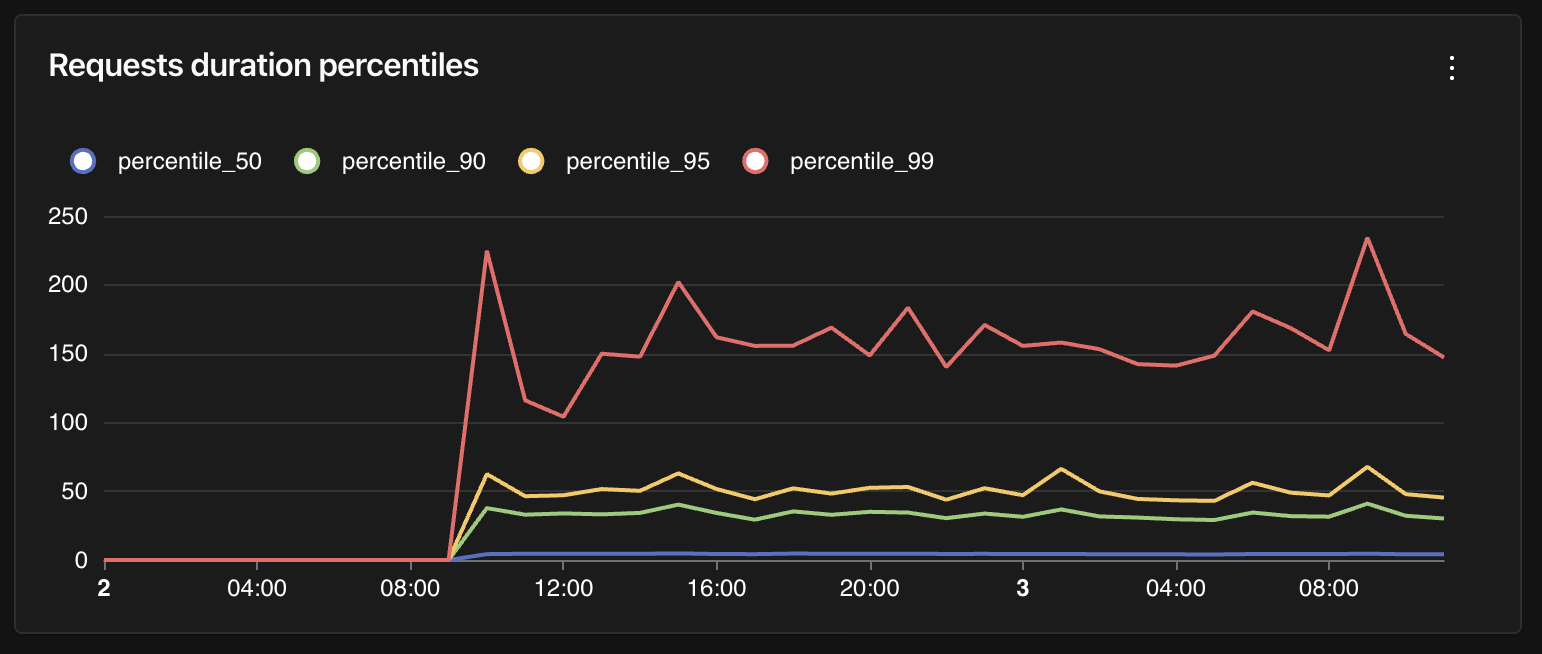
Query HTTP request duration per percentile
In general, it's interesting to visualize HTTP request duration for each percentile. Unlike averages, which may be influenced by extreme values, percentiles allow us to understand the maximum duration of 50%, 90%, 95%, or 99% of requests.
The following is an example query for calculating those percentiles of HTTP request duration:
WITH dataset AS (
  SELECT
    time_bucket('%time_bucket_duration%', start_timestamp) AS x,
    (extract(epoch from end_timestamp - start_timestamp) * 1000) as duration_ms
  FROM records
  WHERE attributes ? 'http.method'
)
SELECT
  x,
  percentile_cont(0.99) WITHIN GROUP (ORDER BY duration_ms) as percentile_99,
  percentile_cont(0.95) WITHIN GROUP (ORDER BY duration_ms) as percentile_95,
  percentile_cont(0.90) WITHIN GROUP (ORDER BY duration_ms) as percentile_90,
  percentile_cont(0.50) WITHIN GROUP (ORDER BY duration_ms) as percentile_50
FROM dataset
GROUP BY x
ORDER BY x DESC;
Notice how we filter records with the http.method attribute set. This is a good starting point for retrieving traces associated with HTTP requests, but depending on your settings, you may need to add more filters.
This query is a good candidate for time series charts in dashboards:
本文总阅读量次