Pydantic Logfire
Logfire, from the team behind Pydantic, is an observability platform built on the same belief as our open source library-that the most powerful tools can be easy to use.
Logfire is different:
- is simple and powerful:Logfire's dashboard is simple relative to the features it provides, ensuring that your entire engineering team actually uses it.
- Python-centric insights:From rich Python object displays, to event loop telemetry, to analyzing Python code and database queries, Logfire gives you unparalleled visibility into Python application behavior.
- SQL format:queries data using standard SQL-all controls,(for many) without learning anything new. Using SQL also means you can query data using existing BI tools and database query libraries.
- OpenTelemetry:Logfire is a self-righteous wrapper for OpenTelemetry that allows you to leverage existing tools, infrastructure, and tools to develop many common Python packages and support almost any language.
- Pydantic Integration:Understand the data flowing through Pydantic models and get built-in analytics for validation.
Pydantic Logfire helps you inspect your application with less code, less time, and better understanding.
Find needles in_stack trace_
We learn about Python and its features. Pydantic Logfire was crafted by Python developers for Python developers to address the unique challenges and opportunities of the Python environment. It's not just about owning data; it's about owning data._correct_Data to present in a meaningful way for Python applications.
In the spirit of Python
- simple yet powerful: Imitating the philosophy of Pydantic Library, Pydantic Logfire provides an intuitive starting point for beginners while providing the depth experts need. It strikes the same balance between ease of use, complexity, and productivity, and is reimagined for observability.
- was born out of Python and Pydantic: As creators immerse themselves in the Python open source ecosystem, we designed Pydantic Logfire to deeply integrate with the nuances of Python and Pydantic, providing a more customized experience than the general observability platform.
Turn data into insights
- pass Deep Python integration Pydantic Logfire automatically inspects your code, provides excellent insight into asynchronous code with minimal manual effort, provides detailed performance analysis, and displays Python objects in the same way as the interpreter. For existing Pydantic users, it also provides you with unparalleled insight into using Pydantic models.
- Structured data and direct SQL access means you can use familiar tools (such as Pandas, SQLAlchemy, or
psql), seamlessly integrate with BI tools, and even leverage AI to generate SQL, ensuring that your Python objects and structured data are available for queries. Using vanilla PostgreSQL as a query language across the platform ensures a consistent, powerful, and flexible query experience. - pass Open Telemetry, Pydantic Logfire provides automatic detection for popular Python packages, supports cross-language data integration, and supports exporting data to any OpenTelemetry compatible backend or proxy.
Pydantic Logfire: The Observability Platform You Deserve
Pydantic Logfireisn't just another tool in the shed; it's a custom solution crafted by Python developers for Python developers to ensure your development work is as smooth and efficient as Python itself.
From the smallest scripts to large-scale deployments, Pydantic Logfire is the observability solution you've been waiting for.
Simple and powerful: rocket: {#simplicity}
Pydantic Logfireshould be very easy to use, just run:
pip install logfire # (1)!
logfire auth # (2)!
-
Pydantic LogfireSDK can be installed from PyPI or Conda,Learn more
-
SDK comes with a CLI for authentication, etc.Learn more
Then in your code:
import logfire
from datetime import date

logfire.configure()  # (1)!

logfire.info('Hello, {name}!', name='world')  # (2)!

with logfire.span('Asking the user their {question}', question='age'):  # (3)!
    user_input = input('How old are you [YYYY-mm-dd]? ')
    dob = date.fromisoformat(user_input)  # (4)!
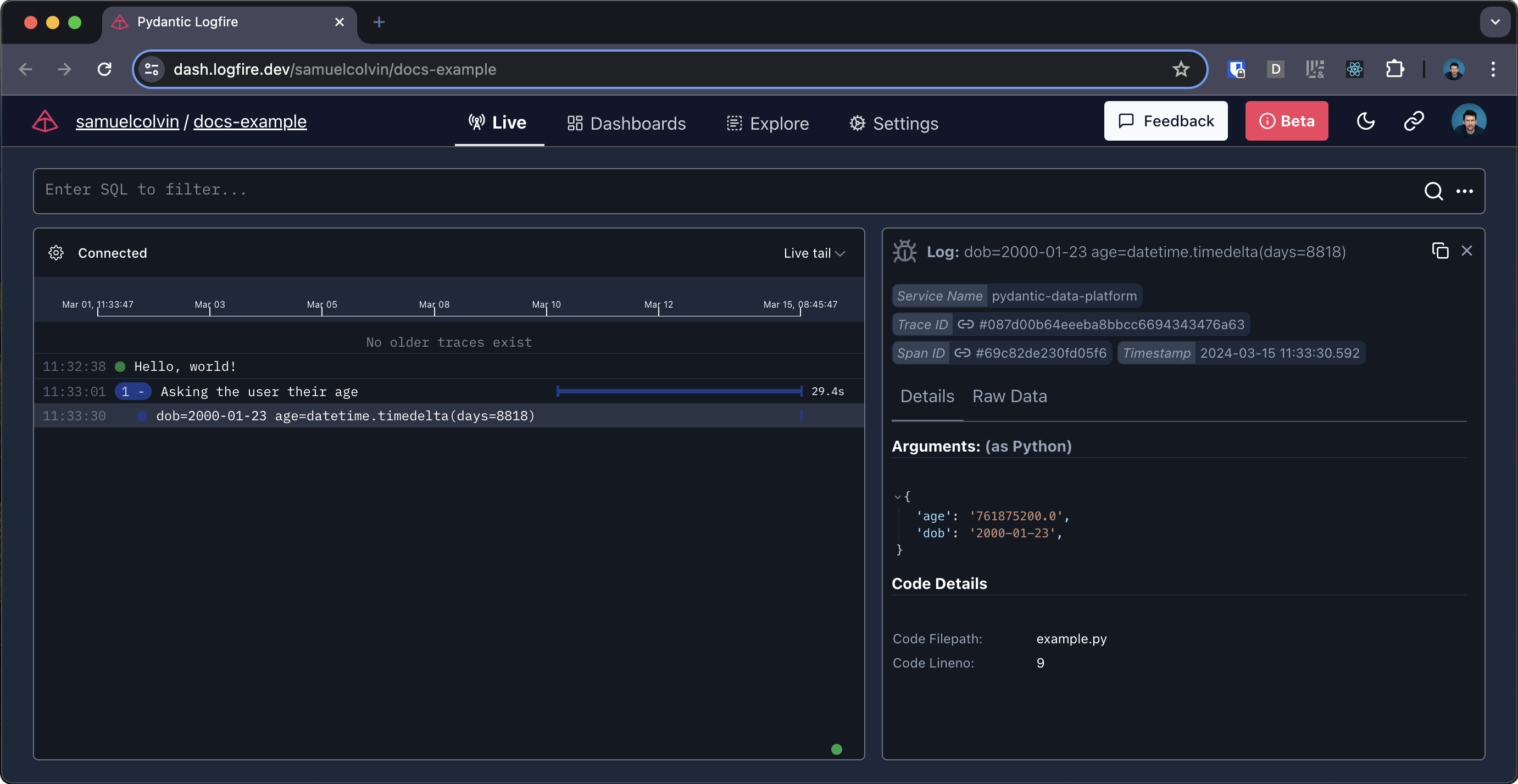
    logfire.debug('{dob=} {age=!r}', dob=dob, age=date.today() - dob)  # (5)!
-
This will record
Hello world!with信息level.name='world'will be stored as properties that can be queried using SQL. -
Spanning allows you to nest other Logfire calls and also measure how long it takes for code to run. They are essential components of traces!
-
Attempts to extract the date from user input. If any exceptions are thrown, the outer span will contain the details of the exception.
-
For example, this will record the
调试level ofdob=2000-01-01 age=datetime.timedelta(days=8838).
This may seem similar to simple logging, but it's much more powerful-you get:
- Structured data in logs
- Nested logs/traces to contextualize what you are viewing
- A custom platform for viewing your data, no configuration required
- And more, such as the beautiful display of Python objects-see below
Attention
If you have existing applications to inspect, you'll get the most value from configuring OTel integration before you start adding logfire.* calls to your code.
Python and Pydantic Insight: snake: {#python}
From rich Python object displays to event loop telemetry and analysis of Python code, Pydantic Logfire gives you a clearer picture of how Python works than any other observability tool.
Logfire also features an out-of-the-box Pydantic integration that lets you understand data passing through Pydantic models and get validation analytics.
We can directly record the Pydantic model:
from datetime import date
import logfire
from pydantic import BaseModel

logfire.configure()

class User(BaseModel):
    name: str
    country_code: str
    dob: date

user = User(name='Anne', country_code='USA', dob='2000-01-01')
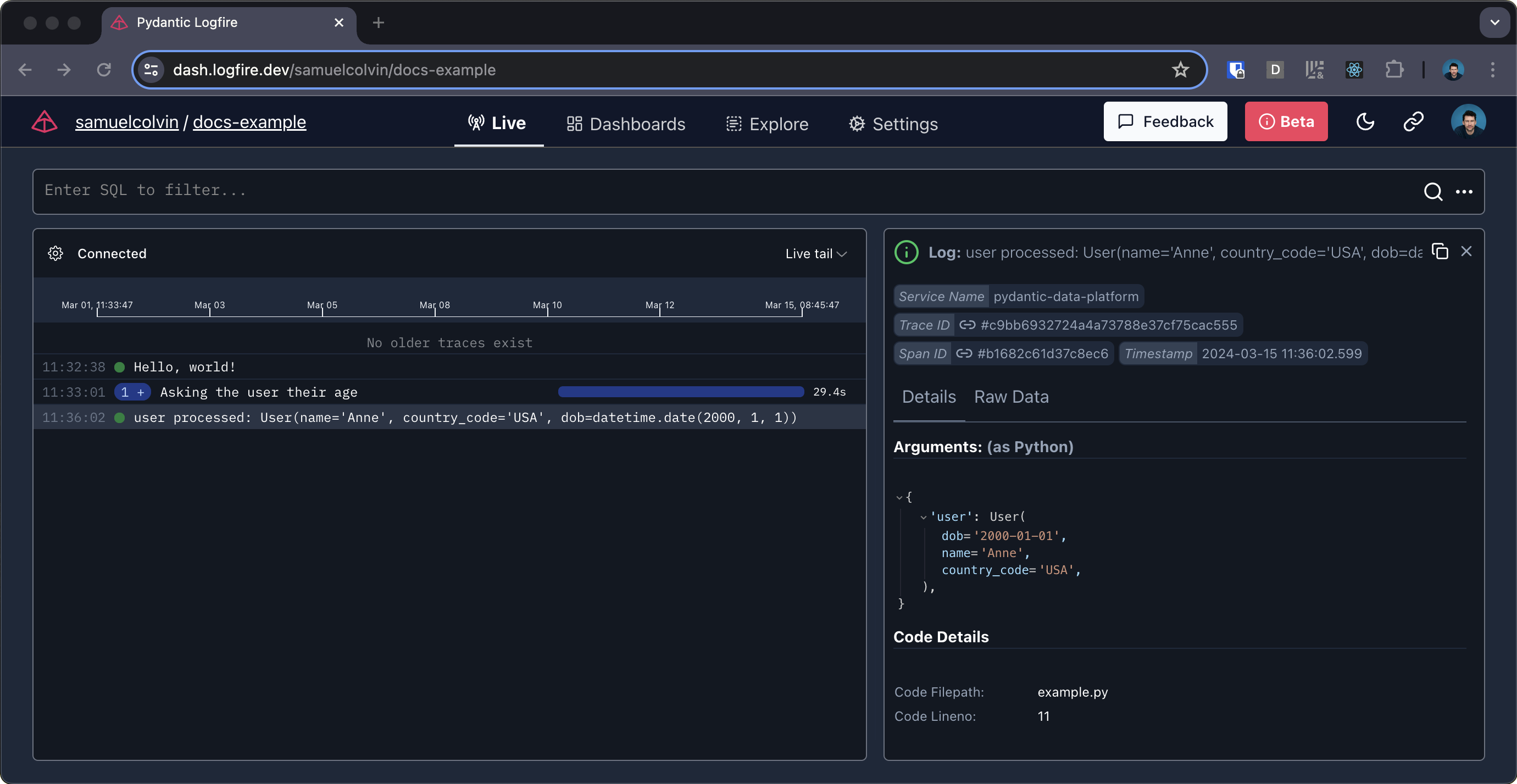
logfire.info('user processed: {user!r}', user=user)  # (1)!
- This will display
用户处理的:User(name='Anne', country_code='US', dob=datetime.date(2000, 1, 1))), but also allows you to see a "beautiful" view of the model in the Logfire platform.
Alternatively, we can automatically record information about validation:
from datetime import date
import logfire
from pydantic import BaseModel

logfire.configure(pydantic_plugin=logfire.PydanticPlugin(record='all'))  # (1)!

class User(BaseModel):
    name: str
    country_code: str
    dob: date

User(name='Anne', country_code='USA', dob='2000-01-01')  # (2)!
User(name='Ben', country_code='USA', dob='2000-02-02')
User(name='Charlie', country_code='GBR', dob='1990-03-03')
-
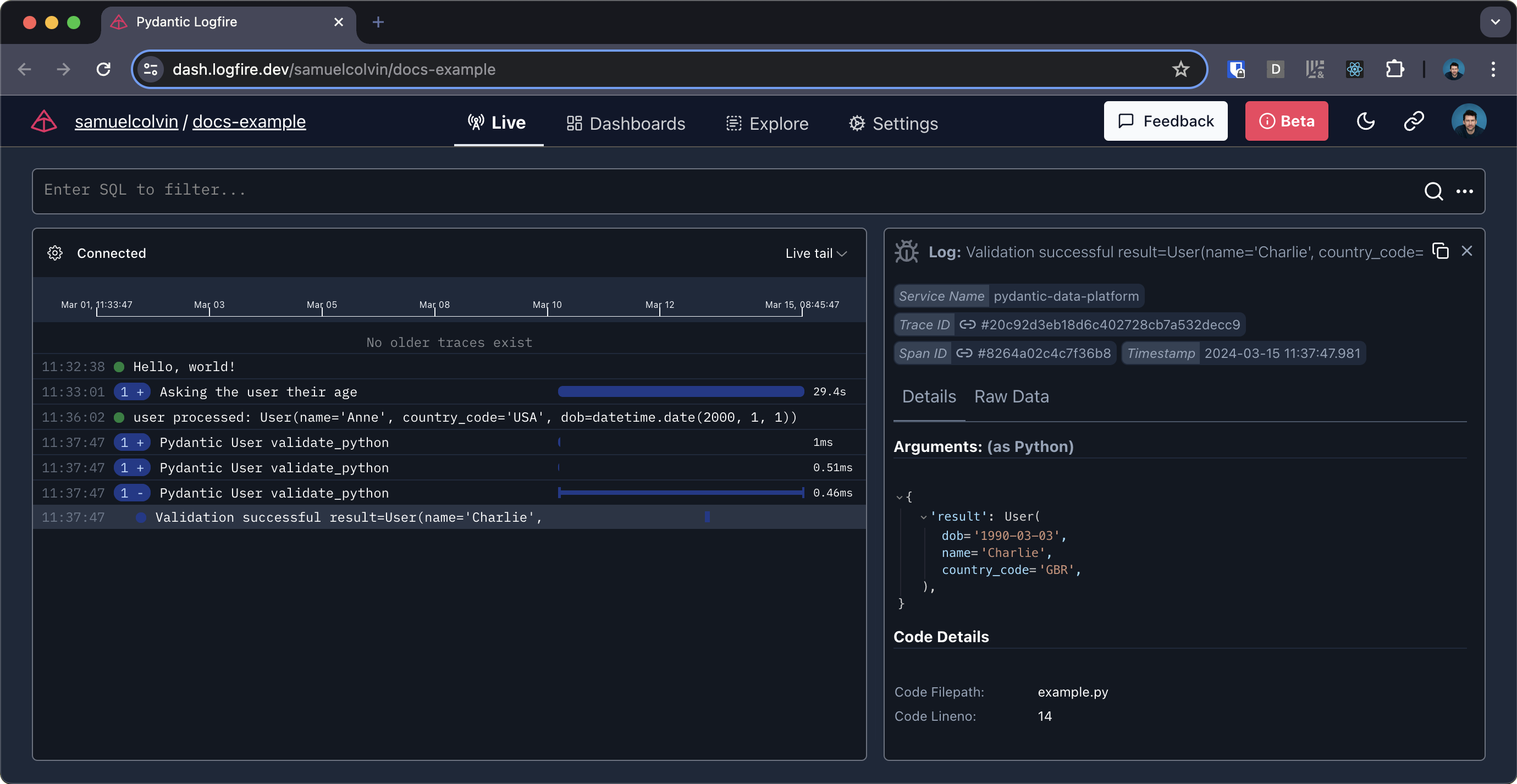
This configuration means that detailed information about all Pydantic model validations will be logged. You can also log only detailed information about validation failures, or only metrics; see the Pydantic plug-in documentation.
-
Since we have enabled the Pydantic plug-in, all Pydantic validations will be logged in Logfire.
Learn about the Pydantic plug-in here for more information about.
OpenTelemetry Under the Hood: Telescopes:{#otel}
SincePydantic Logfireis built on OpenTelemetry, you can use a large number of existing tools and infrastructure, including for the detection of many common Python packages.
For example, we need only 2 lines of code to detect a simple FastAPI application:
from datetime import date
import logfire
from pydantic import BaseModel
from fastapi import FastAPI

app = FastAPI()

logfire.configure()
logfire.instrument_fastapi(app)  # (1)!
# next, instrument your database connector, http library etc. and add the logging handler (2)


class User(BaseModel):
    name: str
    country_code: str
    dob: date


@app.post('/')
async def add_user(user: User):
    # we would store the user here
    return {'message': f'{user.name} added'}
- except Configure logfire Besides, this line is usually all you need to detect FastAPI applications using Logfire, and the same applies to most other popular Python Web frameworks.
The2. "Integration" page contains more information about how to detect other parts of the app.
we need to install FastAPI contrib package FastAPI itself and uvicorn to run it:
pip install 'logfire[fastapi]' fastapi uvicorn  # (1)!
uvicorn fastapi_example:app # (2)!
-
Install the 'logfire' package with 'fastapi' extra, FastAPI and uvicorn.
-
Run FastAPI apps using uvicorn.
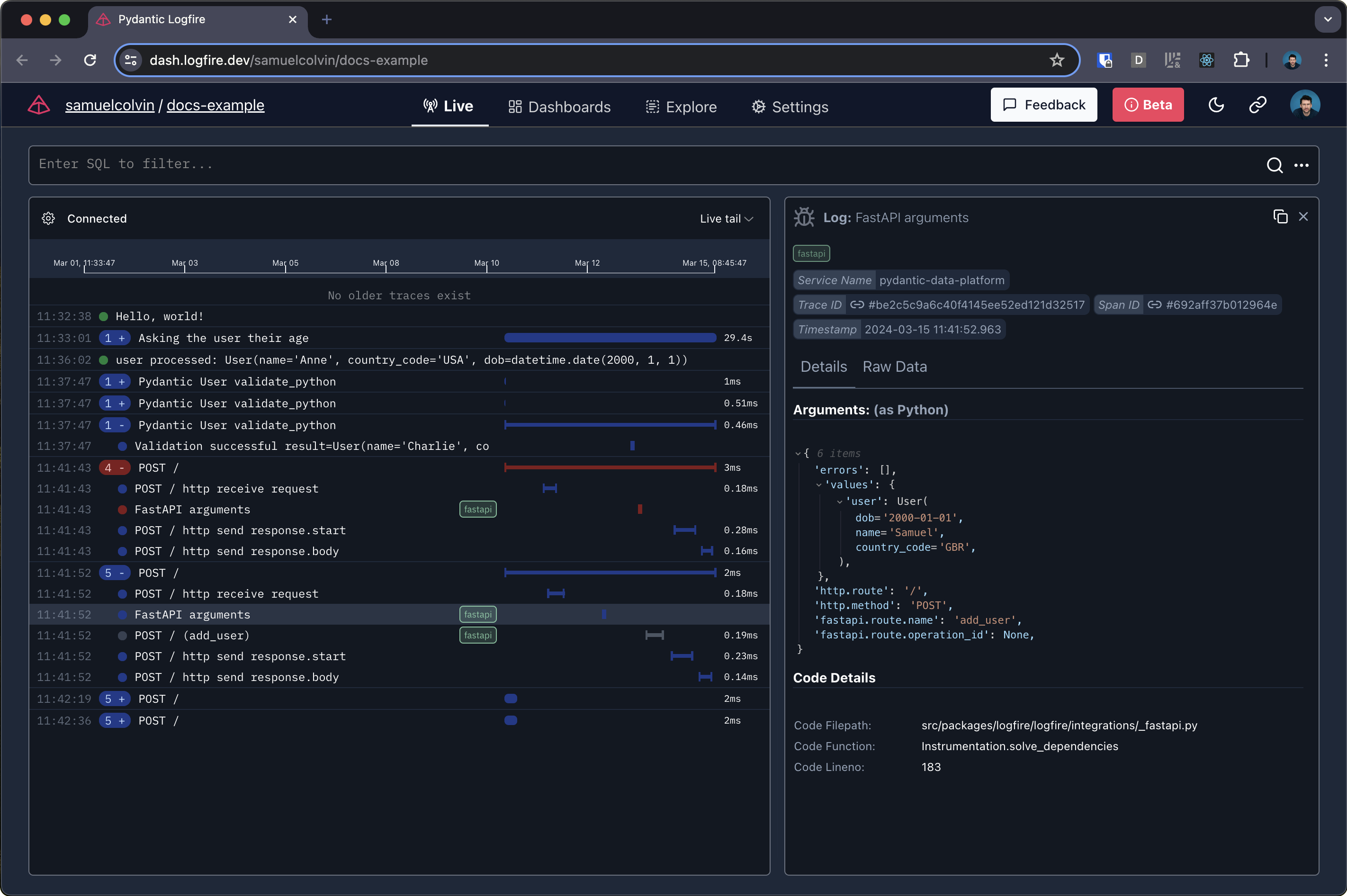
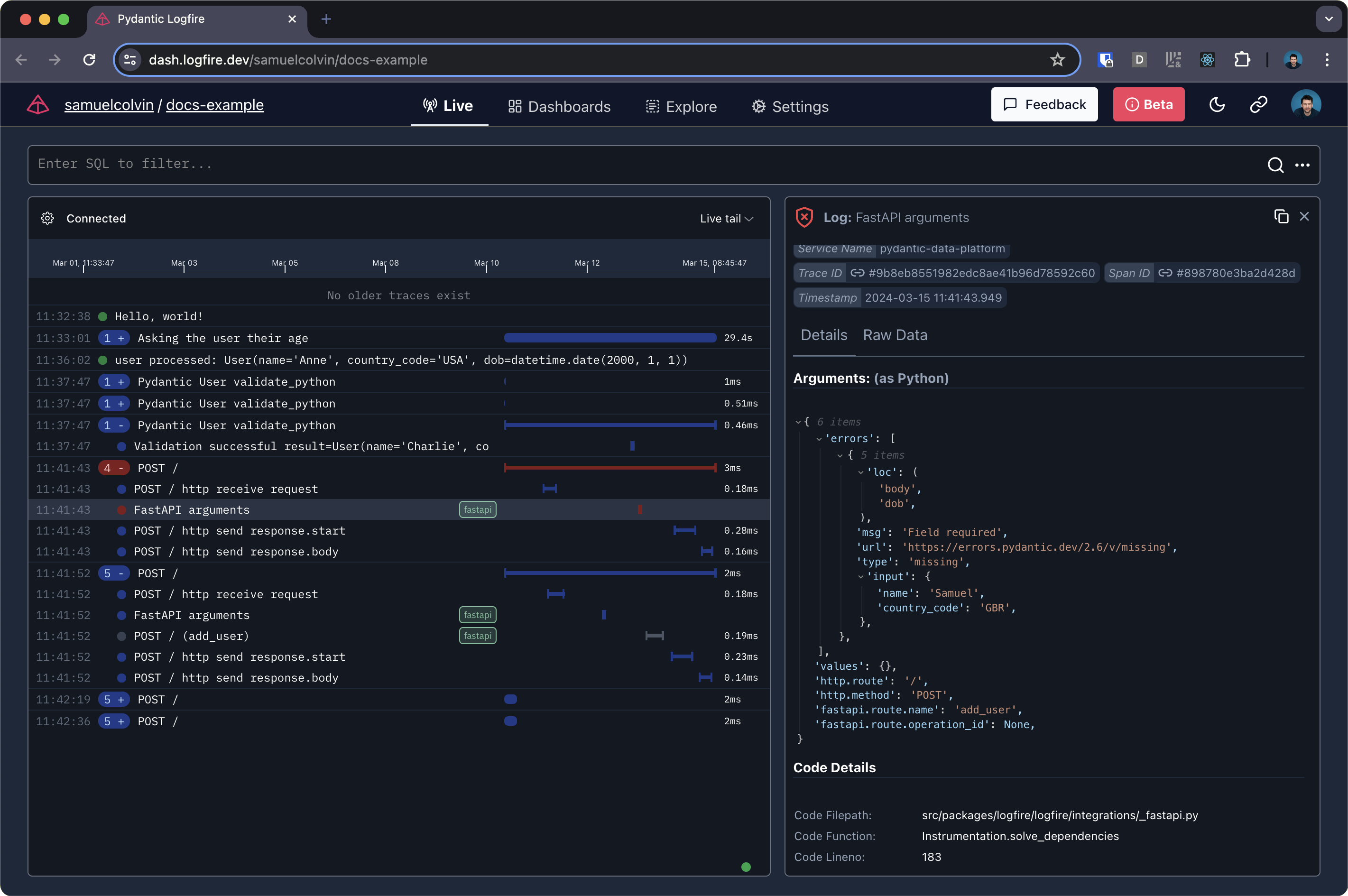
This will give you information about the HTTP request, as well as details about the results of successful input validation:
and details of failed input validation:
Structured Data and SQL: abacus: {#sql}
Query data with pure canonical Postgres SQL-all control,(for many) without learning anything new. We even provide direct access to the underlying Postgres database, which means you can query Logfire with any Postgres compatible tool you like. This includes dashboard building platforms like Superset, Grafana and Google Looker Studio, but also includes Pandas、SQLAlchemy even psql。
A big advantage of using the most widely used SQL databases is that generative AI tools like ChatGPT are excellent at writing SQL for you.
Simply include your Python object in anLogfirecall (list, dictionary, data class, Pydantic model, data frame, etc.) and it will be readily available for querying as structured data in our platform.
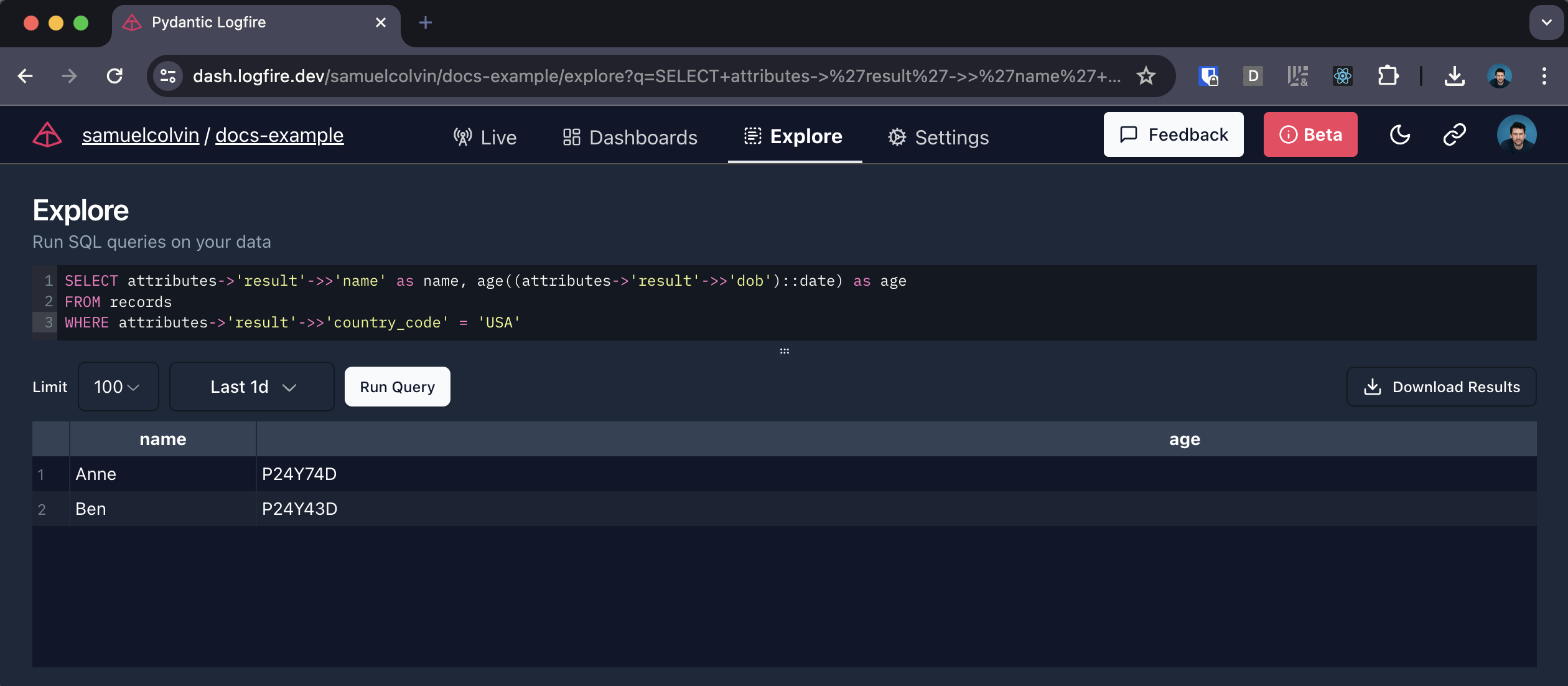
For example, using the data in the 用户 model above, we can list users from the United States:
SELECT attributes->'result'->>'name' as name, age(attributes->'result'->>'dob') as age
FROM records
WHERE attributes->'result'->>'country_code' = 'USA'
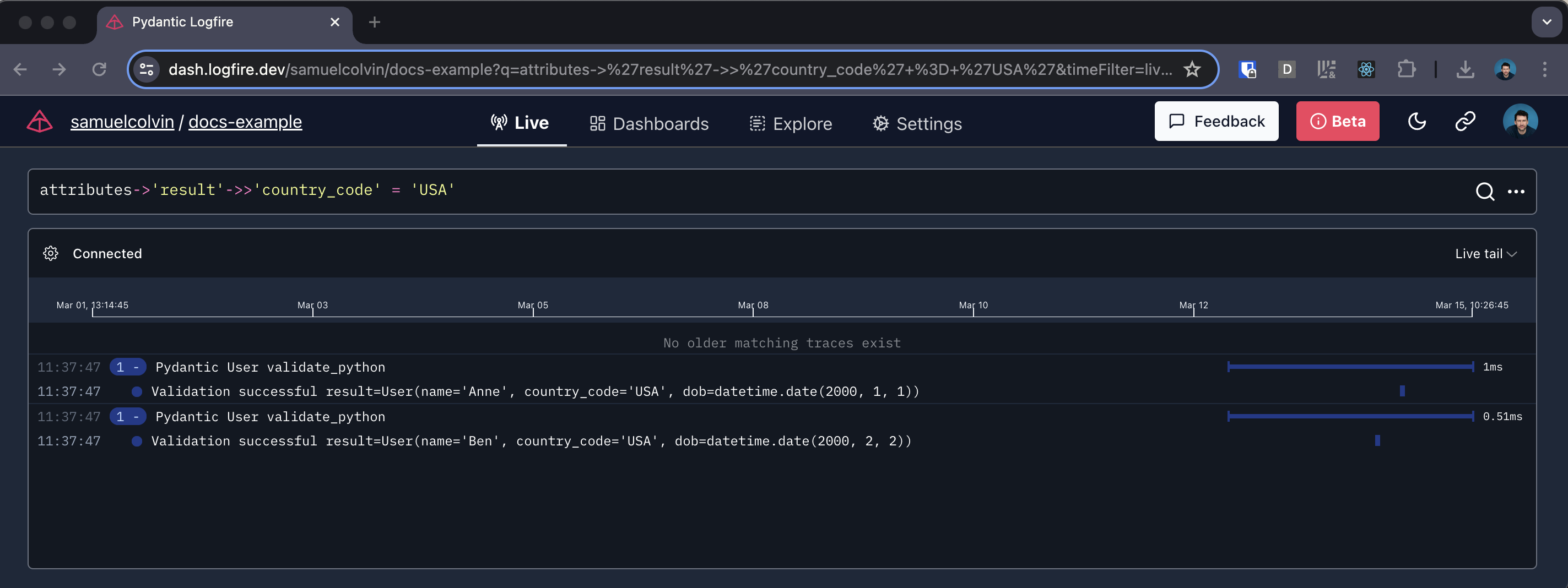
You can also filter to show only tracks relevant to U.S. users in Live View
attributes->'result'->>'country_code' = 'USA'
本文总阅读量次