Add Manual Tracing
Span, logging and tracking
Here is a simple example of using Logfire:
import time

import logfire

logfire.configure()

with logfire.span('This is a span'):
    time.sleep(1)
    logfire.info('This is an info log')
    time.sleep(2)
If you run this, it should print something similar:
Logfire project URL: https://logfire.pydantic.dev/my_username/my_project_name
21:02:55.078 This is a span
21:02:56.084   This is an info log
The Open Project URL should display the following in Live view:

A blue box with an 1+ indicates that the span contains 1 immediate child. Click the box to expand the span to show its children:

Please note:
-
Any span or log created in an
with logfire.span(...):block will be a child of that span. This allows you to organize logs well in a structured tree. You can also view this parent-child relationship in an indented console log. -
A span has a start time and an end time, so it has a duration. This span takes 3 seconds to complete.
-
For logs, the start and end times are the same, so they have no duration. However, you can still see in the UI that the log was created 1 second after the span started and 2 seconds before the span ended.
If you click the Explore link in the top navigation bar, you can write SQL to explore further, for example:
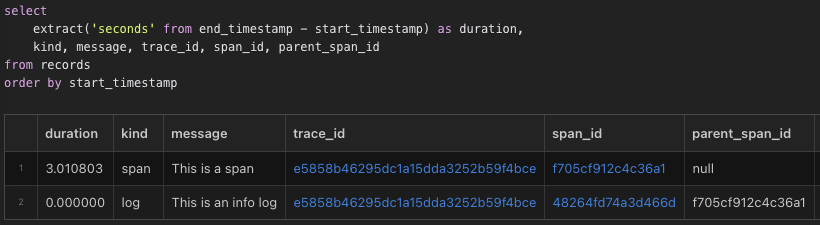
Note:
-
Span and log are stored together in the same
记录in the table. -
Log
的parent_span_idis spanspan_id. -
Both have the same
trace_id. You can click it to open a new tab in Live view that has been filtered to that_trace_.
_trace_is a span/log tree that shares the same root. Whenever a new span/log is created without an active span, a new trace is created. If it is a span, any descendants of that span will be part of the same trace. To organize logs well into traces, it is best to create spans at the top level to represent advanced operations, such as processing Web server requests.
property
Spanning and logging can attach structured data such as:
logfire.info ('Hello ', name=' World')
If you click the "Hello" log in the live view, you should see the following in the details panel on the right:
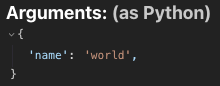
This data is stored in JSON format in the 属性 column of the 记录 table. For example, you can use attributes->>'name' = 'world' in the SQL filter at the top of the live view to display only this log. This is used as the WHERE clause for SQL queries on the 记录 table.
span and logs can both have attributes with arbitrary values that are intelligently serialized to JSON as needed. You can pass any keyword parameter to set attributes as long as they do not start with an underscore (_). This namespace is reserved for other keyword parameters with logfire-specific meanings.
Sometimes it is useful to attach attributes to a scope after it is created but before it is complete. You can do this by calling the span.set_attribute method:
with logfire.span('Calculating...') as span:
    result = 1 + 2
    span.set_attribute('result', result)
Message and span names
If you run this code:
import logfire

logfire.configure()

for name in ['Alice', 'Bob', 'Carol']:
    logfire.info('Hello {name}', name=name)
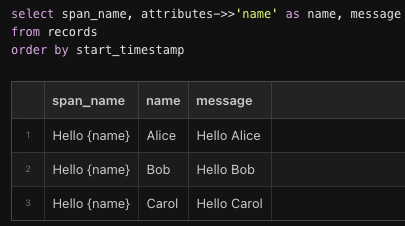
Here you can see:
-
The first parameter,
“Hello {name}”, becomes the value of thespan_namecolumn. You can use it to find all records from the same code, even if the messages are different, for example using the SQL filterspan_name = 'Hello {name}'. -
span Name is also used as an
str.format-style template formatted with attributes to generate消息columns. This message is what is displayed in console logs and live views.
You can also set span.message after the span starts but before the span is complete, for example:
with logfire.span('Calculating...') as span:
    result = 1 + 2
    span.message = f'Calculated: {result}'
You can use 消息 to filter related records, such as “Hello%”之类的消息, but it is more efficient to filter an span_name column because it is indexed. Again,span_name = 'Hello {name}' 和 attributes->>'name' = 'Alice' is better than message = 'Hello Alice'.
In order to be able to filter related records effectively, span names_cardinal number_Should be low, which means they should not vary too much. For example, it would be bad:
name = get_username()
logfire.info('Hello ' + name, name=name)
Because now the span_name column will have a different value for each username. But this is good:
Because the span_name column now has only two values ('Goodbye {name}' and 'Hello {name}'), and filtering span_name = 'Hello {name}' is easier and more efficient than filtering span_name = '{word} {name}' 和 attributes->>'word' = 'Hello'.
When you want the span name to be different from the message template, you can use the _span_name parameter, for example:
word = 'Goodbye' if leaving else 'Hello'
logfire.info(word + ' {name}', name=name)
This sets span_name to “Hello” and 消息 to “Hello world”。 Note that the _span_name parameter begins with an underscore to distinguish it from attributes.
logfire.info('Hello {name}', name='world', _span_name='Hello')
f-strings
Instead:
logfire.info('Hello {name}', name=name)
It is much more convenient to use F-String to avoid repeating NAME three times:
logfire.info(f'Hello {name}')
Contrary to the previous section, this is in Python 3.11+._result_Good, because Logfire will use special magic to span_name set to “Hello {name}” and will name property is set to name variable, so it's equivalent to the previous code snippet. Here's what you need to know:
-
This feature is enabled by default in Python 3.11+. You can use [
logfire.configure(inspect_arguments=False)][logfire.configure(inspect_arguments)] Disable it. You can also enable it in Python 3.9 and 3.10, but it is more likely to not work properly. -
Under normal circumstances, check parameters should always be valid. Note that the source code must be available, so for example, simply deploying the
.pycfile will cause it to fail. -
If the parameter check fails, you will receive a warning, and the f-string parameter will be used as a format template. This means that you will get a high cardinality span name, such as
“Hello Alice”, and no名称attribute, but the information will not be completely lost. -
If checking parameters is enabled, parameters are checked regardless of whether the f string is used. So if you write
logfire.info('Hello {name}', name=name)and checking parameters fails, you will still receive a warning. -
The values in f-strings are calculated and formatted again by Logfire. This means that if
get_username()(or string conversion of whatever it returns) is costly or has side effects, you should avoid using code likelogfire.info(f'Hello {get_username()}'). -
The first argument must be the actual f string.
logfire.info(f'Hello {name}')will work, butmessage = f'Hello {name}'; logfire.info(message)won't, and neither willlogfire.info('Hello ' + name). -
Checking parameters is cached so that the performance overhead of checking the same f string repeatedly is minimal. However, parsing large source files incurs significant overhead the first time parameters need to be checked. Either way, avoiding this overhead requires disabling checking parameters altogether, not just avoiding f strings.
abnormal
logfire.span The context manager will automatically log any exceptions that caused it to exit, such as:
import logfire

logfire.configure()

with logfire.span('This is a span'):
    raise ValueError('This is an error')
If you click Span in Live View, the right panel has an Abnormal Backtracking tab:
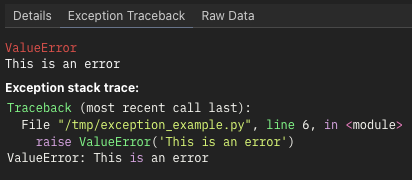
Exceptions that are caught but not rethrown will not be logged, for example:
with logfire.span('This is a span'):
    try:
        raise ValueError('This is an acceptable error not worth recording')
    except ValueError:
        pass
If you want to log handled exceptions, use the span.record_exception Methods:
with logfire.span('This is a span') as span:
    try:
        raise ValueError('Catch this error, but record it')
    except ValueError as e:
        span.record_exception(e)
Alternatively, if you want to log exceptions only and not create spans for normal cases, you can use logfire.exception:
try:
    raise ValueError('This is an error')
except ValueError:
    logfire.exception('Something went wrong')
logfire.exception(...) is equivalent to logfire.error(..., _exc_info=True)。 If you want to record non-error level backtracking in the log, you can also use _exc_info with other logging methods. If the exception object is not the object being processed, you can set _exc_info to the exception object. Don't forget the leading underscore!
Convenient functional span with @logfire.instrument
Usually, you want to wrap the entire function in a span. Instead of doing this:
def my_function(x, y):
    with logfire.span('my_function', x=x, y=y):
        ...
You can use @logfire.instrument decorator:
By default, this adds function parameters as attributes to span. To disable this feature (for example, if the parameters are large objects that are not worth collecting), use instrument(extract_args=False)。
The default span name is similar to Calling module_name.my_function. You can pass the alternate span name as the first argument to instrument, and it can even be formatted as a template for arguments, for example:
@logfire.instrument('Applying my_function to {x=} and {y=}')
def my_function(x, y):
    ...

my_function(3, 4)
# Logs: Applying my_function to x=3 and y=4
Attention
- '@logfire.instrument' decorator must be applied first, i.e. under any other decorator
- The source code of the function must be accessible.
log level
How to create different levels of logs is as follows:
logfire.tracelogfire.debuglogfire.infologfire.notice(日志火灾通知)logfire.warnlogfire.errorlogfire.fatal
By default,跟踪 and 调试 logs are hidden. You can change this setting by clicking the Default Level drop-down menu in Live View:
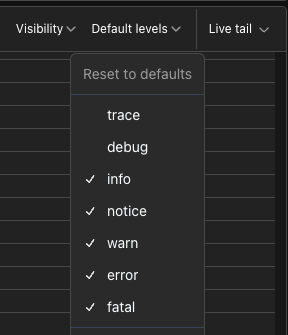
You can also set the minimum level for console logging using logfire.configure , for example:
import logfire

logfire.configure(console=logfire.ConsoleOptions(min_log_level='debug'))
To log messages with variable levels, you can use logfire.log, for example logfire.log('info', 'This is an info log') is equivalent to logfire.info('This is an info log')。
By default, the span is the level 信息. You can change this parameter using the _level parameter, such as 使用 logfire.span('This is a debug span', _level='debug'):. You can also change the level after the span begins but before the span completes using span.set_level . LogfireSpan.set_level], for example:
with logfire.span('Doing a thing') as span:
    success = do_thing()
    if not success:
        span.set_level('error')
In Live view,spans are colored according to their highest level and their descendants. For example, the following code:
import logfire

logfire.configure()

with logfire.span('Outer span'):
    with logfire.span('Inner span'):
        logfire.info('This is an info message')
        logfire.error('This is an error message')
It will appear like this:
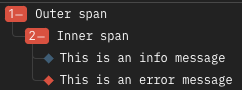
Here, the level of the span itself is still set to 默认 Information, but they are painted red instead of blue because they contain error logs.
If the span ends with an unhandled exception, in addition to logging backtracking as described above, the log level for the span is set to 错误. Use span.record_exception LogfireSpan.record_exception] method.
In the database, log levels are stored as numbers in the 级别 column. These values are based on OpenTelemetry, for example info is 9. You can use the level_num SQL function to convert level names to numbers, for example 级别 > level_num('info') will find all "exception" records. You can also use the level_name SQL function to convert numbers to names, for example SELECT level_name(level)、... to view human-readable levels in Explore view. Note that the level column is indexed, so filtering level = level_num('error') is valid, but filtering level_name(level) = 'error' is invalid.
本文总阅读量次