SQL 탐색기
Logfire를 사용하면 "탐색" 페이지를 사용하여 추적 및 메트릭 데이터에 대한 임의 SQL 쿼리를 실행하여 시스템을 분석하고 조사할 수 있습니다.
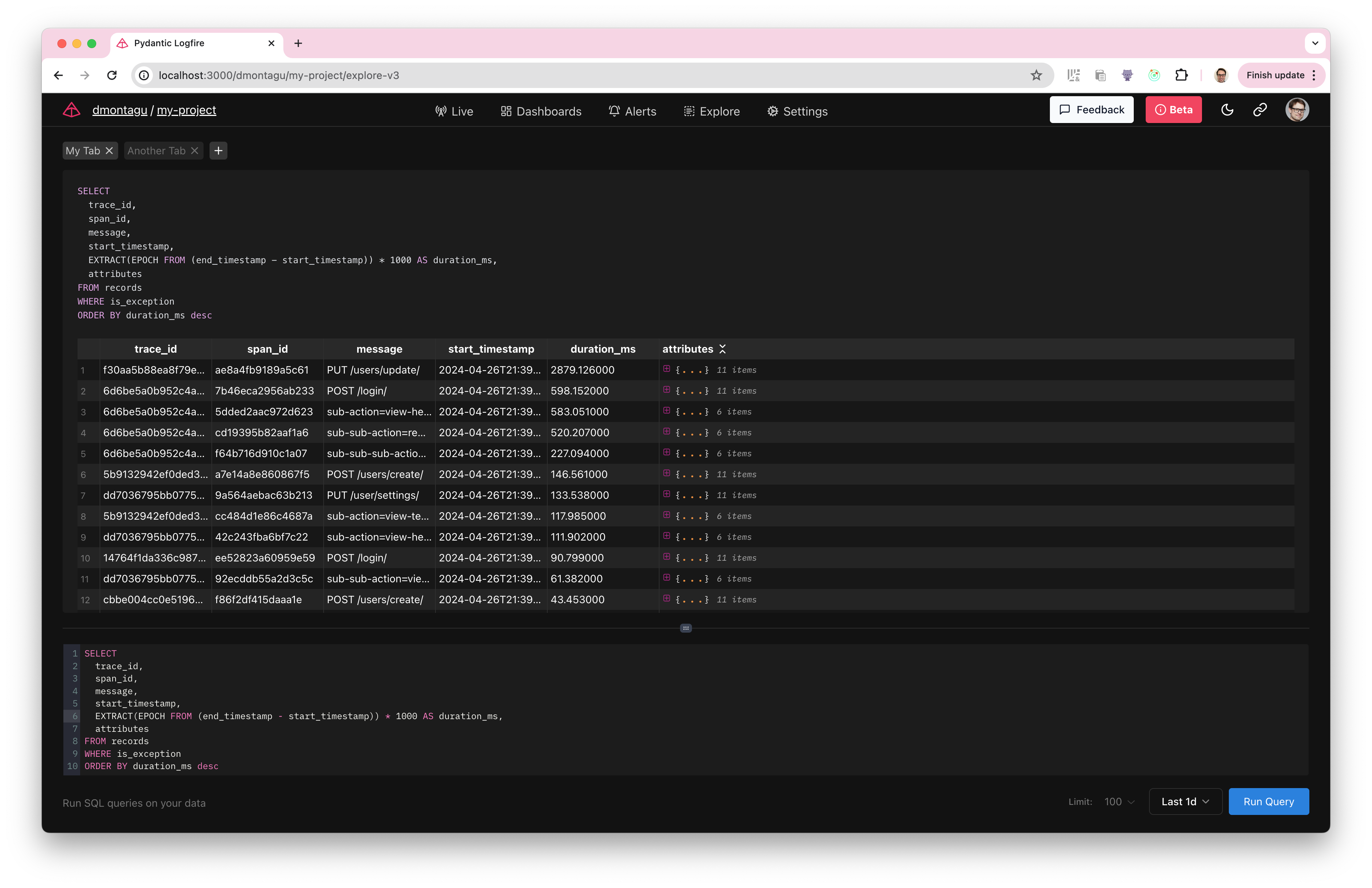
쿼리 추적
쿼리할 기본 테이블은 추적하는 요청의 모든 범위/로그를 포함하는 记录 테이블입니다.
레코드를 쿼리하려면 SELECT ...FROM 记录 를 사용하고 WHERE 절을 추가하여 원하는 범위를 필터링하기만 하면 됩니다.
예를 들어, 다음은 예외가 있는 모든 범위에 대한 메시지, start_time 스탬프, 기간 및 속성을 반환하는 쿼리입니다.
SELECT
  message,
  start_timestamp,
  EXTRACT(EPOCH FROM (end_timestamp - start_timestamp)) * 1000 AS duration_ms,
  attributes
FROM records
WHERE is_exception
또한 하위 쿼리, CTE, 조인, 집계, 사용자 지정 식 및 기타 표준 SQL을 사용하여 보다 복잡한 쿼리를 실행할 수 있습니다.
기록 아키텍처
记录 테이블은 다음과 같이 구성됩니다.
CREATE TABLE records AS (
    start_timestamp timestamp with time zone,
    created_at timestamp with time zone,
    trace_id text,
    span_id text,
    parent_span_id text,
    kind span_kind,
    end_timestamp timestamp with time zone,
    level smallint,
    span_name text,
    message text,
    attributes_json_schema text,
    attributes jsonb,
    tags text[],
    otel_links jsonb,
    otel_events jsonb,
    is_exception boolean,
    otel_status_code status_code,
    otel_status_message text,
    otel_scope_name text,
    otel_scope_version text,
    otel_scope_attributes jsonb,
    service_namespace text,
    service_name text,
    service_version text,
    service_instance_id text,
    process_pid integer
)
라이브 뷰와 교차 연결
쿼리를 실행한 후 trace_id 및/또는 span_id 를 사용하여 라이브 뷰에서 추적으로 나타나는 데이터를 찾을 수 있습니다.
라이브 뷰로 이동하여 다음 쿼리를 입력하십시오.
_id = '7bda3ddf6e6d4a0c8386093209eb0bfc' -- 자신의 실제 _id로 대체
특정 추적 ID가 있는 모든 범위가 표시됩니다.
지표 프레임워크
추적 외에도 指标 테이블을 사용하여 메트릭 데이터를 쿼리할 수도 있습니다.
metrics 테이블은 다음과 같이 구성됩니다.
CREATE TABLE metrics AS (
    recorded_timestamp timestamp with time zone,
    metric_name text,
    metric_type text,
    unit text,
    start_timestamp timestamp with time zone,
    aggregation_temporality public.aggregation_temporality,
    is_monotonic boolean,
    metric_description text,
    scalar_value double precision,
    histogram_min double precision,
    histogram_max double precision,
    histogram_count integer,
    histogram_sum double precision,
    exp_histogram_scale integer,
    exp_histogram_zero_count integer,
    exp_histogram_zero_threshold double precision,
    exp_histogram_positive_bucket_counts integer[],
    exp_histogram_positive_bucket_counts_offset integer,
    exp_histogram_negative_bucket_counts integer[],
    exp_histogram_negative_bucket_counts_offset integer,
    histogram_bucket_counts integer[],
    histogram_explicit_bounds double precision[],
    attributes jsonb,
    tags text[],
    otel_scope_name text,
    otel_scope_version text,
    otel_scope_attributes jsonb,
    service_namespace text,
    service_name text,
    service_version text,
    service_instance_id text,
    process_pid integer
)
추적과 마찬가지로 표준 SQL 쿼리 메트릭을 사용할 수 있습니다. 예를 들어:
SELECT *
FROM metrics
WHERE metric_name = 'system.cpu.time'
  AND recorded_timestamp > now() - interval '1 hour'
쿼리 실행
쿼리를 실행하려면 쿼리를 입력하거나 쿼리 편집기에 붙여넣고 "쿼리 실행" 버튼을 클릭합니다.
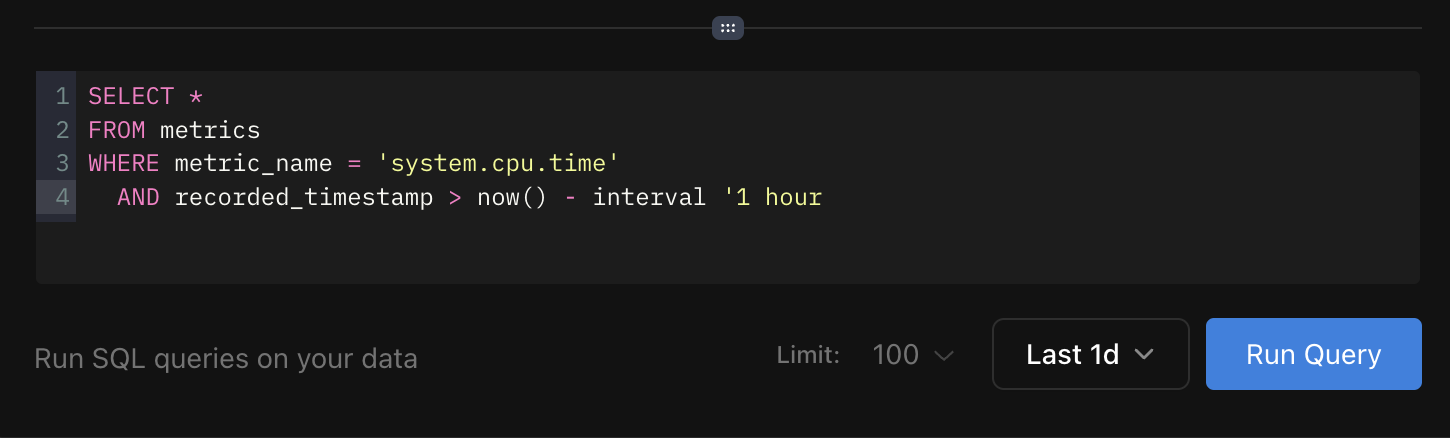
버튼 옆에 있는 드롭다운을 사용하여 쿼리의 시간 범위를 수정할 수 있습니다. 반환되는 최대 결과 행 수를 제어하는 "제한" 드롭다운도 있습니다.
"찾아보기" 페이지는 표준 SQL 쿼리를 사용하여 추적 및 메트릭을 위한 유연한 인터페이스를 제공합니다.
행복한 문의를 기원합니다!
本文总阅读量次